
What is a Lookalike Audience?
Lookalike audiences are powerful and help advertisers target their ads to new customers who "look like" past customers. Every lookalike audience needs a source list of customers to use as a reference point for their model (referred to as a "custom audience").
How to Create a Lookalike Audience With SyncTap
SyncTap makes it easy to build multiple Lookalike audiences in one stop.
1. Choose a source list (Custom Audience) for your Lookalike and target countries.
From the dropdown, choose the basis for your Lookalike Audience. If you haven't created any custom audiences yet, go do that now.

Then, choose the target countries where you want to find similar customers. All Lookalike Audiences are mapped to individual countries. With SyncTap, you can choose multiple countries in this step and multiple audiences will be created as a result.
2. Choose how many Lookalike Audiences to Create For Each Country
Using the dropdown, choose how many audiences you want to create for each country. As you choose more audiences, you'll notice additional sliders will appear below.
Audience size ranges from 1% to 20% of the combined population of your target countries. A 1% lookalike consists of the people most similar to your lookalike source. Increasing the percentage creates a bigger, broader audience.

3. Create Your Lookalike Audience
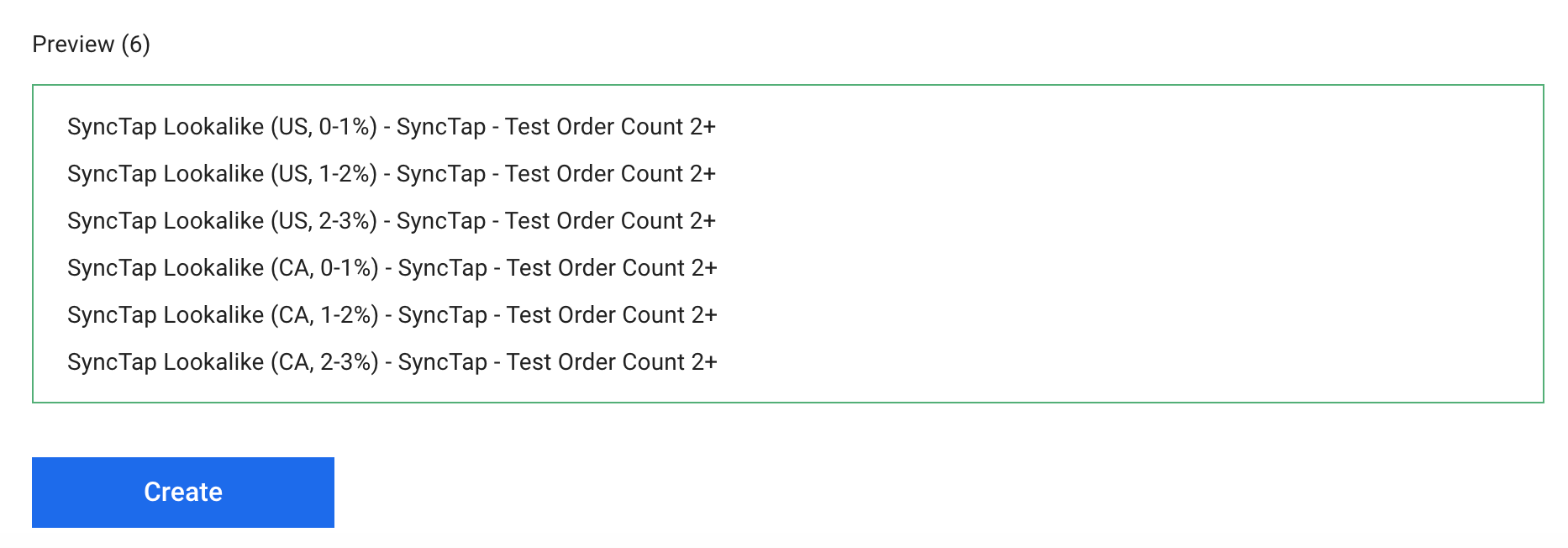
Once you've chosen the number and size of your Lookalike Audiences, you're ready to create them. The preview will indicate how many audiences will be created. The naming convention indicates the country, audience size, and source list used to create the Lookalike Audience.
NOTE: When you create a custom audience with SyncTap that is used in a Lookalike, it is kept up to date in near real-time. That means that your Lookalikes are always using the freshest data possible and won't go stale!
Comments
0 comments
Please sign in to leave a comment.